Security
Security for your documents and the record behind them
A signature is only worth the record behind it. Here is how Refrendo keeps your documents private and the record trustworthy. We describe the audit trail as tamper-evident, not tamper-proof: a later change is detectable, not impossible.
Your organisation’s data is only yours
Every record belongs to one organisation, and every read is checked on the server against the signed-in person’s organisation, never against anything the browser sends. Automated tests try to read another organisation’s data on every change.
Documents that can’t be changed without it showing
Each version of a document is fingerprinted with SHA-256 when it is uploaded, and the database refuses to change or delete a version. A revision is always a new version with a new fingerprint, and approvals stay tied to the version they were given on.
A tamper-evident audit trail
Every step (sent, opened, approved, signed, downloaded) is recorded, and each record is chained to the previous one with a hash, so any edit after the fact is detectable. The database refuses updates and deletes to the audit trail.
Encrypted with your organisation’s own key
Every stored file (documents, signatures, completed documents and certificates) is encrypted by Refrendo with a key of its own, locked by your organisation’s key, before it reaches storage. The storage provider only ever holds scrambled data. Your administrators can rotate the organisation’s key themselves. Files are served only through links that expire within minutes, and nothing is publicly addressable.
Every upload checked before it’s accepted
Each PDF is scanned for malware before Refrendo accepts it, and a file that can’t be scanned is refused. PDFs with scripts, automatic actions or embedded files are refused too, and that kind of content is stripped from every PDF Refrendo produces. Files are checked in a queue away from the app, so a busy moment or a file built to cause trouble never makes anyone else’s upload fail.
Secure signing links
Each signer gets their own high-entropy link, stored only as a hash. Links expire, stop working the moment a request is retracted or revised, and are rate-limited against guessing.
An access code when the email isn’t enough
You can ask for a code before someone opens their request, and give it to them by phone or in person, so a forwarded email or a shared inbox isn’t enough on its own. Five wrong codes pause the link for 15 minutes and tell the sender. Codes are stored only as a hash, and the record shows that a code was entered, never the code.
Signing in
Passwords of at least 10 characters, and two-step verification, which is required to send from a password account. Passkeys (Face ID, Touch ID, Windows Hello or a security key) and Sign in with Microsoft. Everyone can see where they’re signed in and sign other devices out, and sensitive changes need a recent sign-in.
Access that ends when employment does
Removing someone from your organisation ends their access immediately: their sessions, their API keys and their sender seat. Nothing they did is changed. With single sign-on, your identity provider decides who can sign in, on a domain you’ve proven you own.
Permissions, not job titles
Who can send, approve, manage templates, see the whole organisation’s documents or manage billing is set by explicit permissions. Nobody can give out a permission they don’t hold themselves.
Nothing sensitive in our logs
Application logs carry identifiers only. Error reports never include document contents, signatures, request bodies, cookies or IP addresses.
Where it’s hosted
The database is hosted in Sydney, with encrypted backups. Files are kept in private storage with Cloudflare R2, encrypted with your organisation’s key before they get there, and emails are sent through Resend. The privacy policy lists every supplier.
When a document is complete
The completion certificate
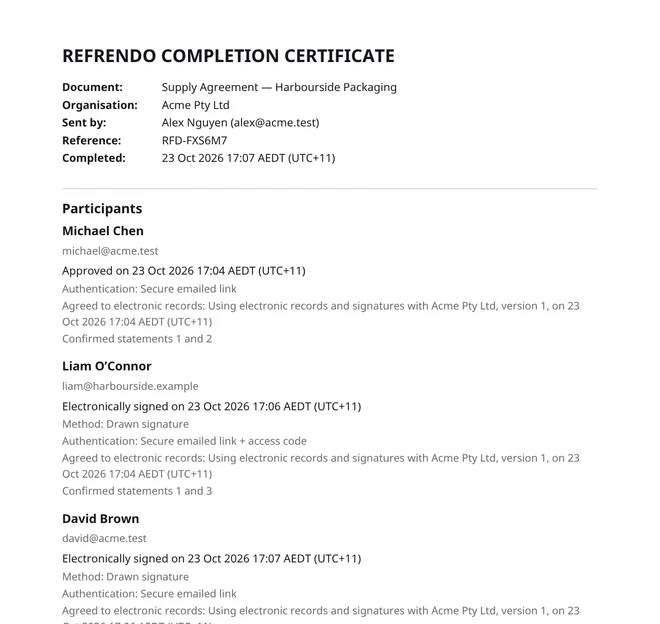
Everyone who took part is emailed a link to download the final PDF, with every signature merged into the page, and, unless the sender turns it off, this certificate. It records:
- the document, your organisation and the request’s reference;
- everyone who approved, signed, reviewed or witnessed it, what they did and when, and who received a copy;
- how each person was identified (a signed-in account, or their own secure emailed link, with an access code where the sender asked for one), how they signed (typed, drawn or uploaded) and their approximate location where it’s known (region and country, never the IP address);
- when each person agreed to electronic records, which disclosure they agreed to, and every statement they confirmed, word for word in the language they saw it;
- SHA-256 fingerprints of the original and the completed PDF, so anyone can check the file in front of them is the one that was signed.
The certificate is PDF/A-2b, the archival standard: every font is inside the file, so it opens and looks the same for as long as it’s kept. Behind it sits the full audit trail.
Questions from your security team
Email security@refrendo.com.au for our security questionnaire answers or to report a vulnerability.
Join the closed beta
Refrendo is invitation-only for now. Organisations in the beta send free for as long as it runs.