How an order moves through Refrendo
- The order is sent. Whoever looks after purchasing starts it from your template, fills in the details (the supplier, the amount, the cost centre), attaches the quote, and checks who will be asked.
- The approvers approve, in order. The budget holder first, then Finance, then anyone else your policy names. Each is emailed only when it is their turn, and reminded if they leave it.
- The requester gets it back, approved. They are on the request as someone who receives a copy, so they are emailed a link to the approved PDF and its certificate the moment the last approval is in.

Approvers open the order from the email, on a laptop or a phone, and approve it, reject it, or ask for changes. Rejecting or asking for changes needs a reason, which goes back to the sender. Nobody in the chain has to sign up or be given a licence first.
What a per-user tool charges for
Acrobat Sign is sold per user, and by Adobe’s own figure a user licence includes 150 transactions a year. The allowance belongs to the individual licence, not the team. Purchase orders tend to go through one or two people, and one person sending every order reaches 150 at about three orders a week. Adobe does not publish a price for transactions past the allowance.
Refrendo’s allowance is monthly and shared by everyone who sends. Approvers, requesters and suppliers are free on every plan. The Team plan has 5 senders and 150 requests a month, shared between them. See pricing for every plan, or how Refrendo compares with Adobe Acrobat Sign.
Matching the order to your approval limits
Most organisations have an approval policy that sets who can approve how much, often called a delegation of authority. Refrendo can follow it for you on Business and above.
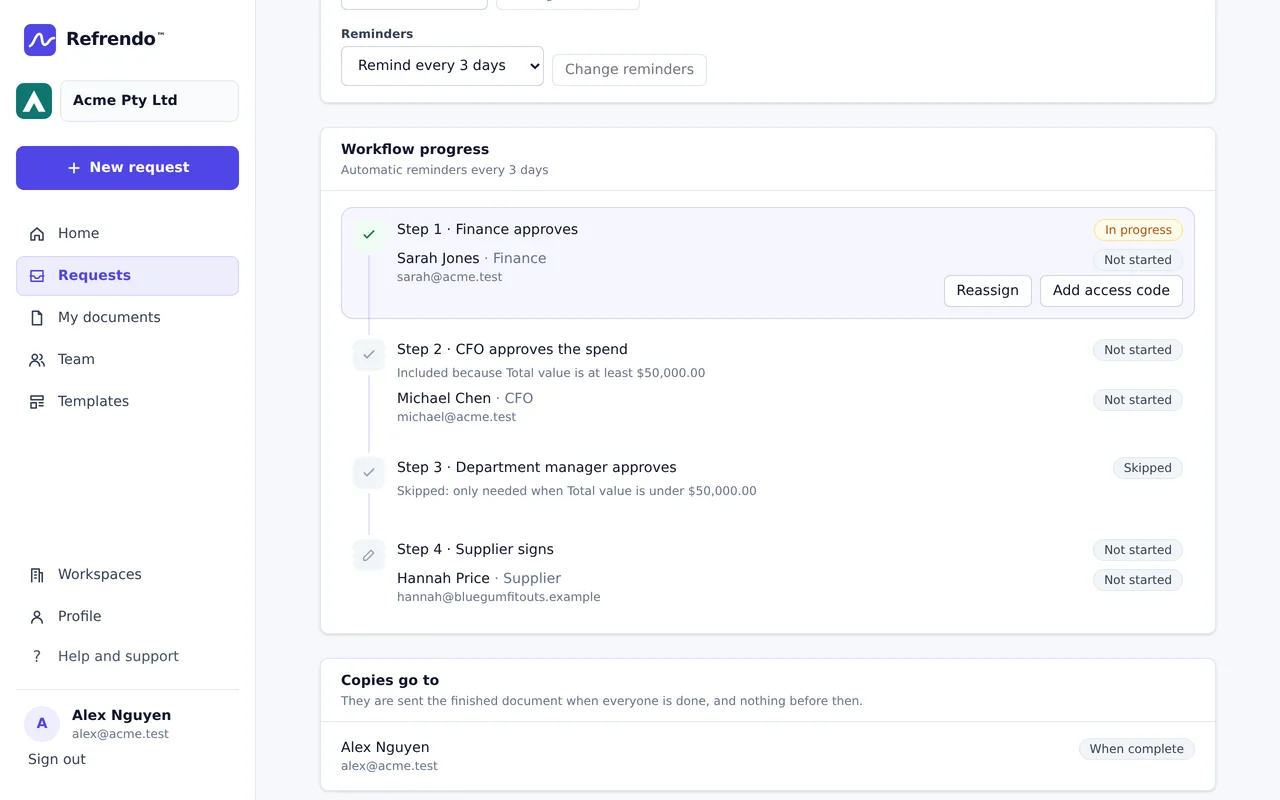
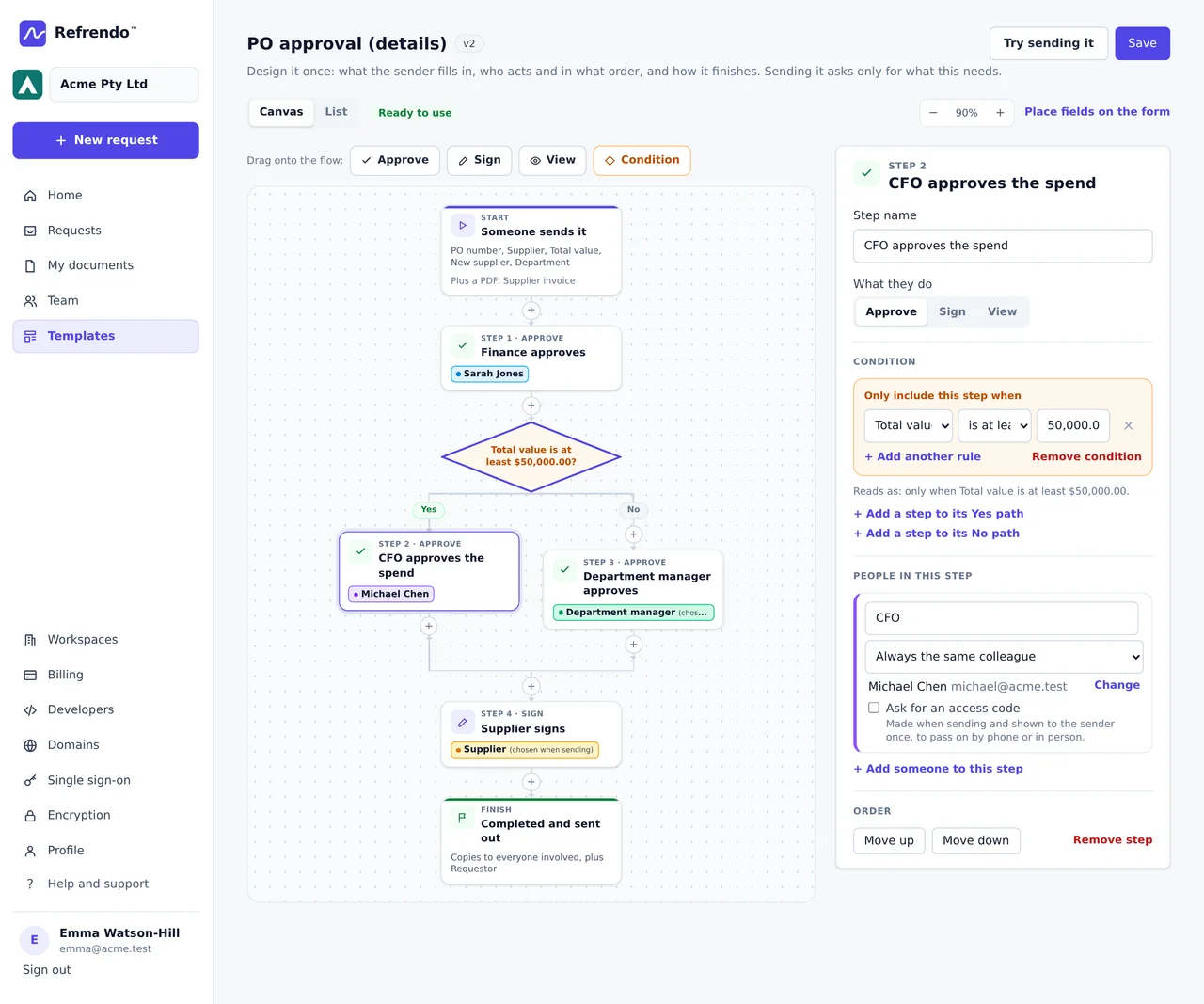
Save your purchase order form as a template, with the details the sender fills in: the supplier, the amount, the cost centre. Each detail can be written onto the order where you place it and used in the request’s title, such as “PO 4471, Northwind Supplies”. Then set a step to apply only when a detail meets a condition, for example the CFO only when the amount is over $50,000. The route is decided when the order is sent, and a step that was left out stays on the request with the reason it was skipped.
The template designer lays the route out as a flowchart, with the Yes and No paths drawn, so you can check it against your policy before anyone sends an order. Every save is a new version of the template, and an order already sent keeps the version it started from.
Changes go back to the start
Every version of the order is kept and fingerprinted, and each decision is recorded against the version it was made on. If Finance asks for a cheaper quote, the revised order goes back through every approver, and the approvals on the old version stay on the record against it. When someone asks later who approved this purchase, at this price, the certificate answers it.
When the supplier should sign too
Sometimes the order is also a contract, and you want the supplier to accept it on your terms rather than reply “confirmed”. Add a signing step for the supplier after the approvals. Their link is sent only once your side has approved, so an order nobody approved cannot reach a supplier. The supplier signs in the browser and never needs an account. If they won’t accept the order as written, they can decline with a reason, and a decline ends the request.
Raise it from your finance system
On Business and above, your ERP or purchasing system can create the request through the REST API the moment an order is raised, with the approvers and the order of the steps set by the system that raised it. Webhooks report each approval, rejection and request for changes, so your own system can update the order’s status without anyone retyping it.
Keeping the record
Purchase orders are business records. Tax records generally have to be kept for five years under section 262A of the Income Tax Assessment Act 1936, and a company’s financial records for seven years under section 286 of the Corporations Act. When an order is approved, download the PDF and the certificate from the request and file them with the order in your own system. On the Business plan Refrendo also keeps them for at least 7 years.
Where to be careful
Payment redirection scams usually arrive as an invoice with new bank details, or details that differ from what you have on file. Approving the order does not check them. Confirm any new bank details by phone, on a number you already had, before anyone pays.
Details about other products are from their public websites as of September 2026 and may have changed. Product names are trademarks of their owners; Refrendo is not affiliated with them.